Customize training
In this section, we will see how to customize the model training.
Metrics
Built-in metrics
We can add metrics to be computed at each epochs during the training. First we define a list of metrics to be computed. In the following example, we will define precision and recall metrics for each class (i.e. from 0 to 5).
# We define a set of built-in metrics to be computed for each epochs
metrics = [
    cls(class_id=class_id)
    for class_id in range(class_nb)
    for cls in [keras.metrics.Precision, keras.metrics.Recall]
]
We then pass the metrics list to the metrics argument of compile(...), in
the form of a dict where the key is the output for which to compute the
metrics:
model.compile(
    loss={tgt_key: keras.losses.CategoricalCrossentropy()},
    optimizer=keras.optimizers.Adam(params.learning_rate),
    metrics={tgt_key: metrics},  # compute the metrics for `tgt_key`
)
When we will run the new code, we will see the metrics displayed on the output:
129/185 [===================>..........] - ETA: 0s
- loss: 0.7192
- ...
- val_softmax_layer_precision: 0.9400
- val_softmax_layer_recall: 0.8174
- val_softmax_layer_precision_1: 0.8095
- val_softmax_layer_recall_1: 0.8633
- val_softmax_layer_precision_2: 0.5635
- val_softmax_layer_recall_2: 0.2886
- val_softmax_layer_precision_3: 0.6867
- val_softmax_layer_recall_3: 0.5337
- val_softmax_layer_precision_4: 0.9014
- val_softmax_layer_recall_4: 0.6038
- val_softmax_layer_precision_5: 0.8496
- val_softmax_layer_recall_5: 0.6882
Question
- Copy
part_1_train.pytopart_1_train_custom.py, and add the precision and recall metrics.
Custom metrics
We can also develop our own metrics. Here is an example with the f-score, that consist in the harmonic mean of the precision and recall.
We will implement our own FScore class, inheriting from
keras.metrics.Metric to compute the F-Score.
import keras


@keras.saving.register_keras_serializable()
class FScore(keras.metrics.Metric):
    """Custom metric for F1-Score class vs all."""

    def __init__(self, class_id, name=None, **kwargs):
        if not name:
            name = f"f_score_{class_id}"
        super().__init__(name=name, **kwargs)
        self.class_id = class_id
        self.precision_fn = keras.metrics.Precision(class_id=class_id)
        self.recall_fn = keras.metrics.Recall(class_id=class_id)

    def update_state(self, y_true, y_pred, sample_weight=None):
        self.precision_fn.update_state(y_true, y_pred)
        self.recall_fn.update_state(y_true, y_pred)

    def result(self):
        p = self.precision_fn.result()
        r = self.recall_fn.result()
        return keras.ops.divide_no_nan(2 * p * r, p + r)

    def reset_state(self):
        # we also need to reset the state of the precision and recall objects
        self.precision_fn.reset_state()
        self.recall_fn.reset_state()

    def get_config(self):
        base_config = super().get_config()
        return {**base_config, "class_id": self.class_id}
As you can see, our class implements update_state() to update the internal
variables, and reset_state() to clear all internal variables. The result
(i.e. the F-Score) is returned in result().
Question
- Create
mymetrics.pyand copy/past the code forFScoreprovided above, - Edit
part_1_train_custom.pyto add the F-Score metrics for each classes.
Solution
Import our new metric class in our main code: And then we can append the metric to the metrics list:Callbacks
In keras, a callback is an object that can perform actions at various stages of training (e.g. at the start or end of an epoch, before or after a single batch, etc). We will introduce a few useful callbacks in the following sections.
Model selection
The current code uses the default settings of keras, which is to export
the model every epochs. Now we use the keras.callbacks.ModelCheckpoint
keras callback to save the model only when the loss reaches a new minimum over
the validation dataset.
save_callback = keras.callbacks.ModelCheckpoint(
params.model, # model file path (.keras file)
save_best_only=True, # save only the best models
monitor="val_loss", # metric or loss to monitor
mode="min", # when a new min is reached
verbose=2, # log something when saving
)
Question
Use the custom model selection loss reference: for instance, instead of the min loss value, save the model when the FScore metric reaches a new max for the class 1.
Tensorboard
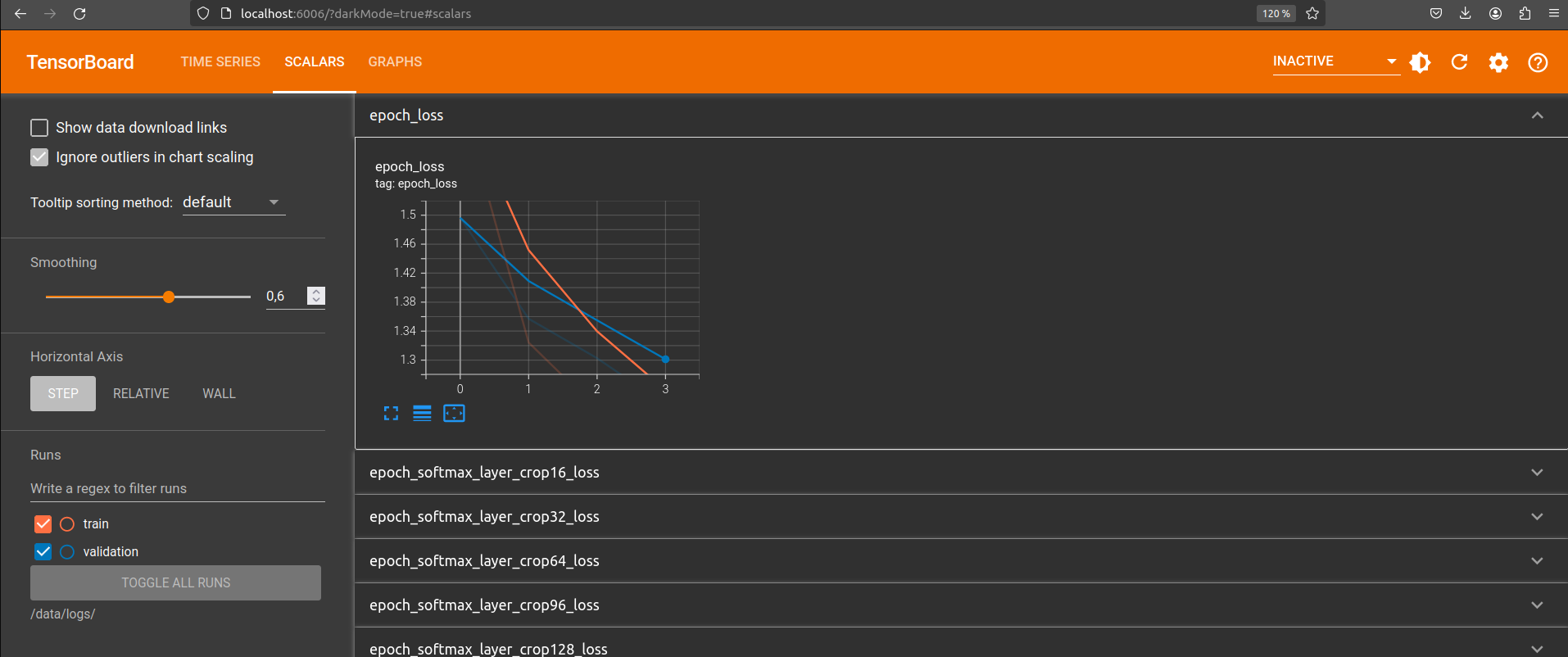
Tensorboard is very useful to monitor in real time your training. In this section, we provide a very simple example to show how it can be used to monitor the metrics during the training. Tensorboard and TensorFlow summaries can be also used for other objects, like images, etc.
To add summaries to your training, use an instance of the keras built-in
keras.callbacks.TensorBoard callback.
Fit() with callbacks
Callbacks are provided to the fit() function using the callbacks
argument, in the form of a list of callbacks.
To use the previously created callbacks, we pass them to fit():
model.fit(
ds_train,
epochs=params.epochs,
validation_data=ds_valid,
callbacks=[save_callback, tb_callback],
)
Running tensorboard
To start tensorboard, you can run a second otbtf docker image with port 6006 open, then run the following:
To access the tensorboard, just open http://localhost:6006 in your web browser.
Info
In linux environment you can start tensorboard in command-line with the
port 6006 open, looking in the /data/logs/ directory for logs, using
the following command (replace $DATA_DIR with your mount point):
Note
If tensorbard is running on another server, just replace localhost with your server URL or IP address.
Question
Edit part_1_train_custom.py:
- Add the model selection callback
- Add the tensorboard callback
- Add the command line argument
log_dirto the parser, to specify the logs folders to store the summaries for tensorboard. - Run the code using
/data/logsas tensorboard summaries folder: - Observe the scalar summaries in TensorBoard
Solution
import argparse
import otbtf
import keras
from mymetrics import FScore
class_nb = 6 # number of classes
inp_key = "input" # model input
tgt_key = "estimated" # model target
def dataset_preprocessing_fn(sample):
return {
inp_key: sample["img"],
tgt_key: otbtf.ops.one_hot(labels=sample["labels"], nb_classes=class_nb),
}
def create_dataset(img, labels, batch_size=8):
otbtf_dataset = otbtf.DatasetFromPatchesImages(
filenames_dict={"img": img, "labels": labels}
)
return otbtf_dataset.get_tf_dataset(
batch_size=batch_size,
preprocessing_fn=dataset_preprocessing_fn,
targets_keys=[tgt_key],
)
# Training dataset
ds_train = create_dataset(["/data/a_img_10m.tif"], ["/data/a_labels.tif"])
ds_train = ds_train.shuffle(buffer_size=100)
# Validation dataset
ds_valid = create_dataset(["/data/b_img_10m.tif"], ["/data/b_labels.tif"])
def conv(inp, depth, kernel_size, name, activation="relu"):
conv_op = keras.layers.Conv2D(
filters=depth,
kernel_size=kernel_size,
strides=1,
activation=activation,
padding="valid",
name=name,
)
return conv_op(inp)
pool = keras.layers.MaxPool2D(pool_size=(2, 2))
class SimpleCNNModel(otbtf.ModelBase):
""" " This is a subclass of `otbtf.ModelBase` to implement a CNN"""
def normalize_inputs(self, inputs):
"""This function nomalizes the input, scaling values by 1e-4"""
return {inp_key: keras.ops.cast(inputs[inp_key], "float32") * 1e-4}
def get_outputs(self, normalized_inputs):
"""This function implements the model"""
inp = normalized_inputs[inp_key]
net = conv(inp, 16, 5, "conv1") # 12x12x16
net = pool(net) # 6x6x16
net = conv(net, 32, 3, "conv2") # 4x4x32
net = pool(net) # 2x2x32
net = conv(net, 64, 2, "feats") # 1x1x32
# Classifier
estim = conv(net, class_nb, 1, "softmax_layer", activation="softmax")
argmax_op = otbtf.layers.Argmax()
return {
tgt_key: estim,
"estimated_labels": argmax_op(estim), # additional output: class id
"features": net, # additional output: features
}
parser = argparse.ArgumentParser(description="Train a CNN model")
parser.add_argument("--model", required=True, help="model path")
parser.add_argument("--log_dir", required=True, help="log directory")
parser.add_argument("--batch_size", type=int, default=4)
parser.add_argument("--learning_rate", type=float, default=0.0002)
parser.add_argument("--epochs", type=int, default=100)
params = parser.parse_args()
model = SimpleCNNModel(dataset_element_spec=ds_train.element_spec)
# We define a set of built-in metrics to be computed for each epochs
metrics = [
cls(class_id=class_id)
for class_id in range(class_nb)
for cls in [keras.metrics.Precision, keras.metrics.Recall]
]
# Another set of metrics with our own metric class
metrics += [
    FScore(class_id=class_id, name=f"fscore_cls{class_id}")
    for class_id in range(class_nb)
]
model.compile(
loss={tgt_key: keras.losses.CategoricalCrossentropy()},
optimizer=keras.optimizers.Adam(params.learning_rate),
metrics={tgt_key: metrics}, # compute the metrics for `tgt_key`
)
model.summary()
save_callback = keras.callbacks.ModelCheckpoint(
    params.model,  # model file path (.keras file)
    save_best_only=True,  # save only the best models
    monitor="val_loss",  # metric or loss to monitor
    mode="min",  # when a new min is reached
    verbose=2,  # log something when saving
)
tb_callback = keras.callbacks.TensorBoard(log_dir=params.log_dir)
model.fit(
    ds_train,
    epochs=params.epochs,
    validation_data=ds_valid,
    callbacks=[save_callback, tb_callback],
)
Dig deeper 🚀
Early stopping callback
The early stopping callback enables to halt the process when the training stops improving.
Question
- Use a
keras.callbacks.EarlyStoppinginstance and append it to the callbacks list (keras documentation). - Observe the effect of the different parameters using tensorboard to monitor the losses and the moment training stops.